The plan was modest: scroll a folder tree without waiting for it.
For years my daily Windows machine had a folder tree that behaved like it was paging results in from somewhere far away. Scrolling Explorer's tree view was excruciating - visibly repainting, hesitating on expand, losing my place. A file manager is the tool you touch ten thousand times a year. When the tool that shows you your own disk can't keep up with a scroll wheel, it stops being an annoyance and becomes a standing question: how hard can this actually be?
The confirmation came later
This spring, Microsoft confirmed what every Windows user already knew: File Explorer is sluggish, and fixing it is now a program of work. The first fix ships Explorer preloaded into memory at logon so the window merely appears fast. The head of product for the Windows shell describes an "AND" approach - launch-sequence optimizations and removing bloat and foundational fixes for the disk reads and hangs - rolling out incrementally over the coming months.
Critics called preloading a brute-force patch over an architectural problem: modern XAML layered on a thirty-year-old Win32 foundation, spending extra memory so the slowness starts earlier. I read that article with the particular calm of someone who gave up waiting years ago. The tree view radicalised me long before Redmond confirmed the diagnosis.
To be fair, a later interview with Marcus Ash, Microsoft's CVP of design for Windows, explains why they struggle: every modernization has to keep a thirty-year compatibility promise, and the frameworks themselves have to be rebuilt before the old UI can move onto them. Control Panel has been mid-migration since Windows 8 - thirteen years and counting. It is a real constraint, honestly described.
But I started from scratch, and starting from scratch cuts the other way: there is no excuse for anything to be slow on day one. That principle made real decisions. The early Windows iterations embedded the native shell context menu - the thing a file manager is "supposed" to use - and there is simply no way to make it open reliably fast, because a right-click loads every third-party extension installed on the machine, whenever it feels like it. We prewarmed it, we cached it, and it still owned our worst frame. So Ferail draws its own context menu, identical on every platform, built from data the app already holds. Nothing in the menu path can touch a disk, so nothing in the menu path can stall.
Earning the feature set
Ferail did not appear in one attempt. There were several versions on Windows first - iterations whose real job was to find out which features deserve to exist and what they actually cost: what instant-feeling enumeration needs, where thumbnails and metadata have to come from, which ideas sound good and die on contact with a spinning external drive. The last Windows iteration grew into a full native codebase in its own right before I made the jump.
The jump was Rust. Partly for the usual reasons - a native binary, no garbage collector to pause a scroll, and a compiler that turns concurrency mistakes into compile errors. Partly because I wanted to properly learn the language, and nothing teaches a language like a project you refuse to abandon. The UI runs on GPUI, the GPU-accelerated framework extracted from the Zed editor: every frame is drawn like a game renders, which is exactly the discipline a file list that must never stutter wants.
The plan was honest from the first day, and it was hiding in the name: take everything that had gone rusty, and rebuild it in Rust.
The Mac detour
By then I was working on a Mac, which replaced one frustration with a stranger one. Finder is slick and genuinely fast - and oddly alien. Icons float wherever they were dropped until you remember to order them somehow. Navigating to an arbitrary path means knowing the secret handshake of Cmd+Shift+G. Copying a file's path is Option+Cmd+C, which you learn from a forum post, not from the menu you were looking at. Even moving a file is half-hidden: there is no Cut, so you either drag, or you discover that a copy quietly becomes a move if you paste with Option+Cmd+V. None of it is slow; all of it is knowledge you have to carry in your head.
The irony is that underneath the cryptic cockpit sits a wonderful engine. The Mac's filesystem makes copying and moving a bliss - clones are instantaneous, moves are atomic, nothing grinds. The machinery was never the problem. The problem is how much you have to already know before the machinery does what you meant.
The drawing side of macOS deserves the same respect. Windows on a Mac glide because the operating system owns the display loop: every app hands its rendered layers to WindowServer, a separate system process that composites the whole screen at the display's refresh rate, every frame, no matter what the apps are doing. A stalled app freezes only its own content - the desktop keeps gliding around it. The OS sets a rhythm and dares every app to keep up with it. Ferail's answer is to render like a game on the cadence the system hands it, with a standing rule that nothing on the paint path may ever touch a disk.
Rendering like a game does not mean burning power like one - and the fps readout in Ferail's status bar has to be read the other way round from a game's. It measures how often the app chooses to draw, not how fast it can: while you scroll it reports the burst rate of the frames actually drawn - the display's own refresh - and when nothing changes, Ferail draws nothing at all, so at idle it honestly reads 0 fps. In a game, 0 fps is death; in a file manager it is the whole point. The pixels are already right, so not a watt goes into repainting them. The figure doubles as a tripwire, too: an app that redraws while idle shows its leak as a number. Alongside it, the CPU sits around one percent and the whole app lives in a couple of hundred megabytes - reported live by the status bar, so the claim is checkable from inside the tool making it.
That reframed the project. The enemy on Windows was wasted time. The enemy on macOS was wasted attention. So the goal became one sentence: a file manager that costs the least possible energy to understand what is going on.
Answers before questions
Most of Ferail's personality follows from that sentence. The information you would otherwise have to ask for is simply already there:
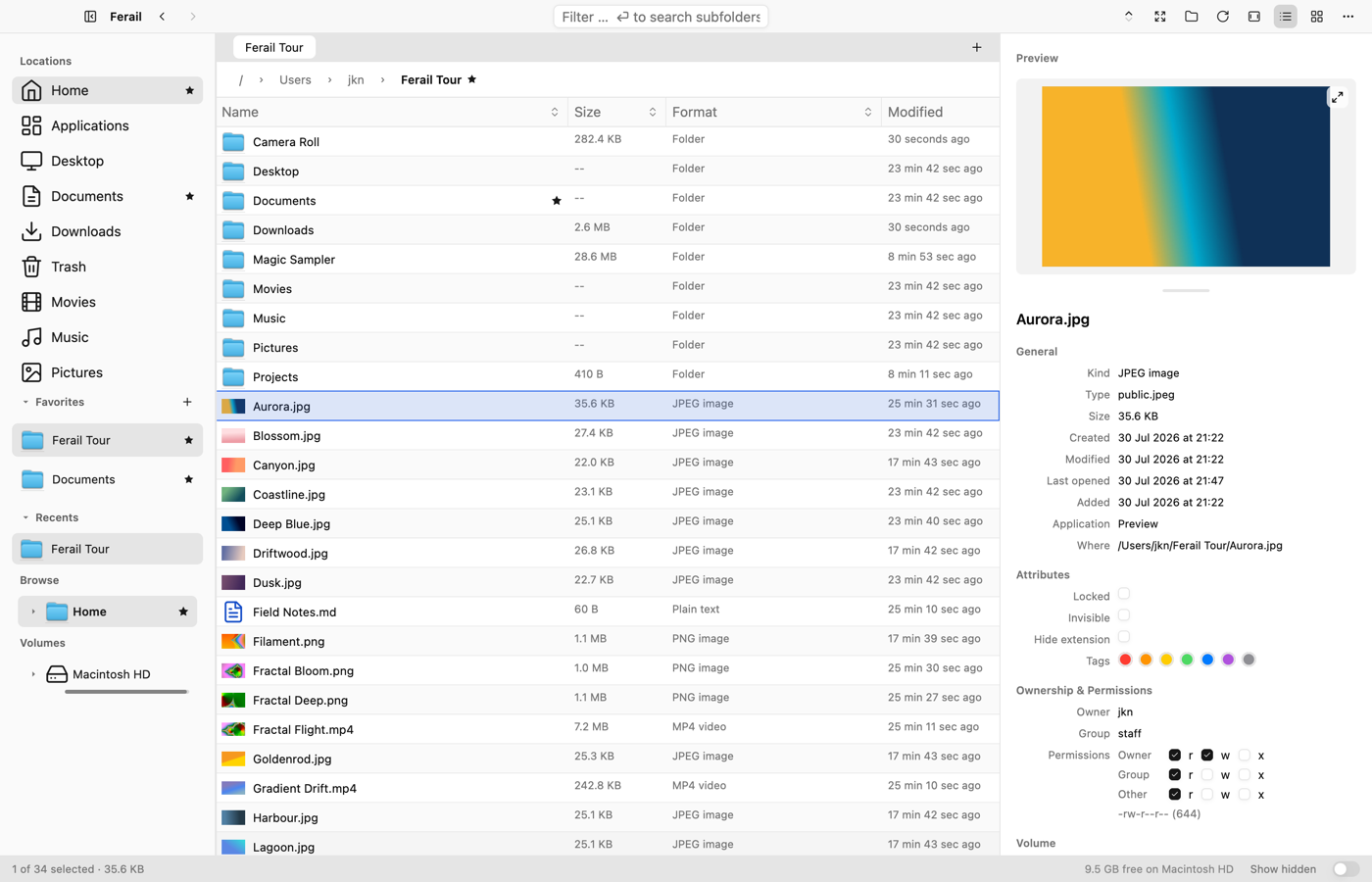
- The Ant Trail shades the folders I actually visit, so my own habits are visible and yesterday's working directory is one glance away.
- A folder's disclosure pointer - or its absence - tells me whether there are subfolders before I click, not after.
- A folder's size is its real, recursive size. The number means what you think it means.
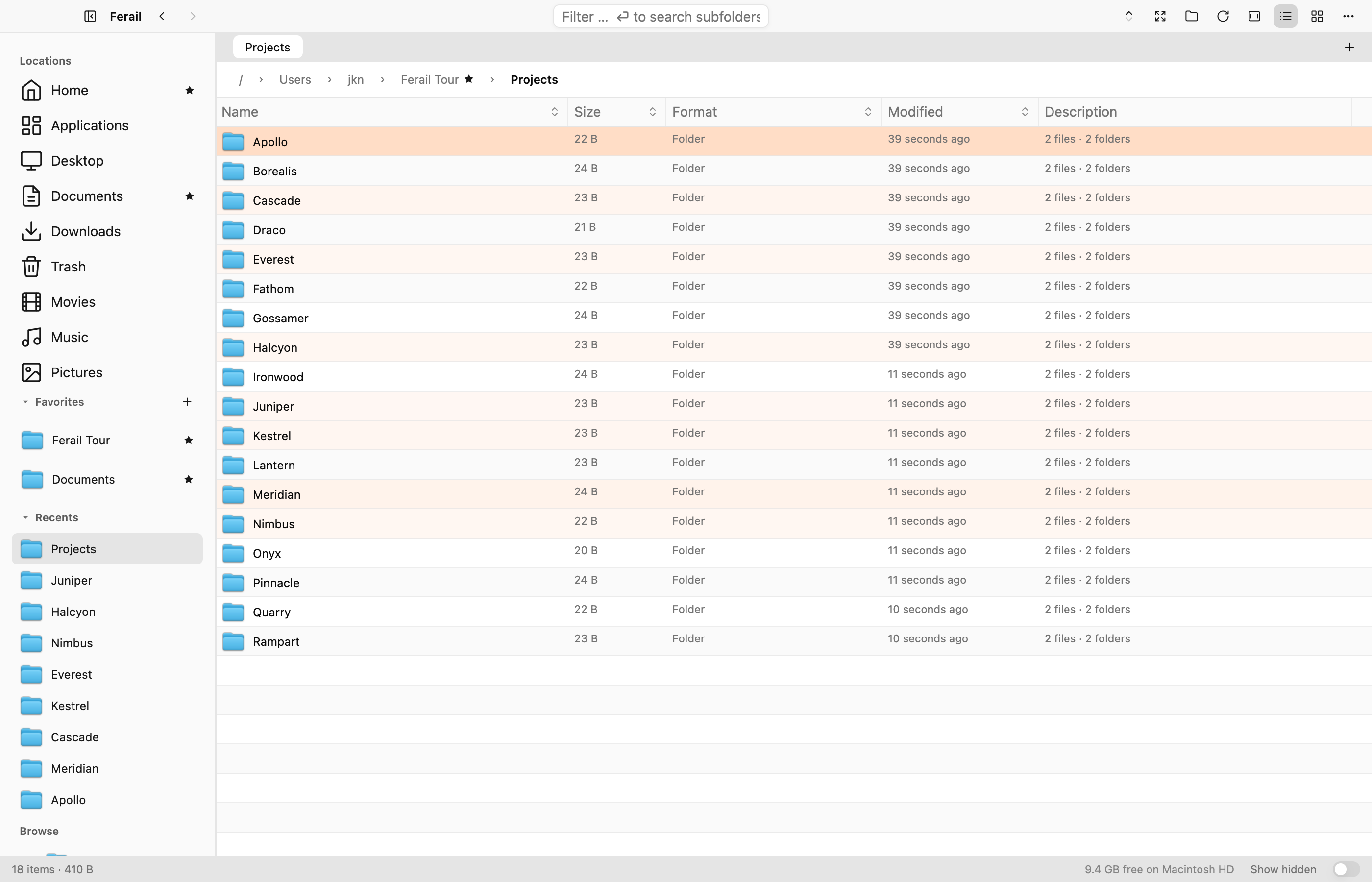
- An archive's description says how many entries it holds and whether it already has a single root folder - so I know before extracting whether it will unpack tidily or explode across my directory.
-
Every file is identified by its bytes, not its extension, and a
Description column states what a file is:
6000 × 4000for a photo,stereo · 48 kHz · 42 minfor an audio file,arm64 + x86_64for a universal binary,1,204 entries · single root folderfor a zip. And when content and extension disagree - aHoliday Photo.jpgwhose bytes say ZIP - the row is flagged and says so.
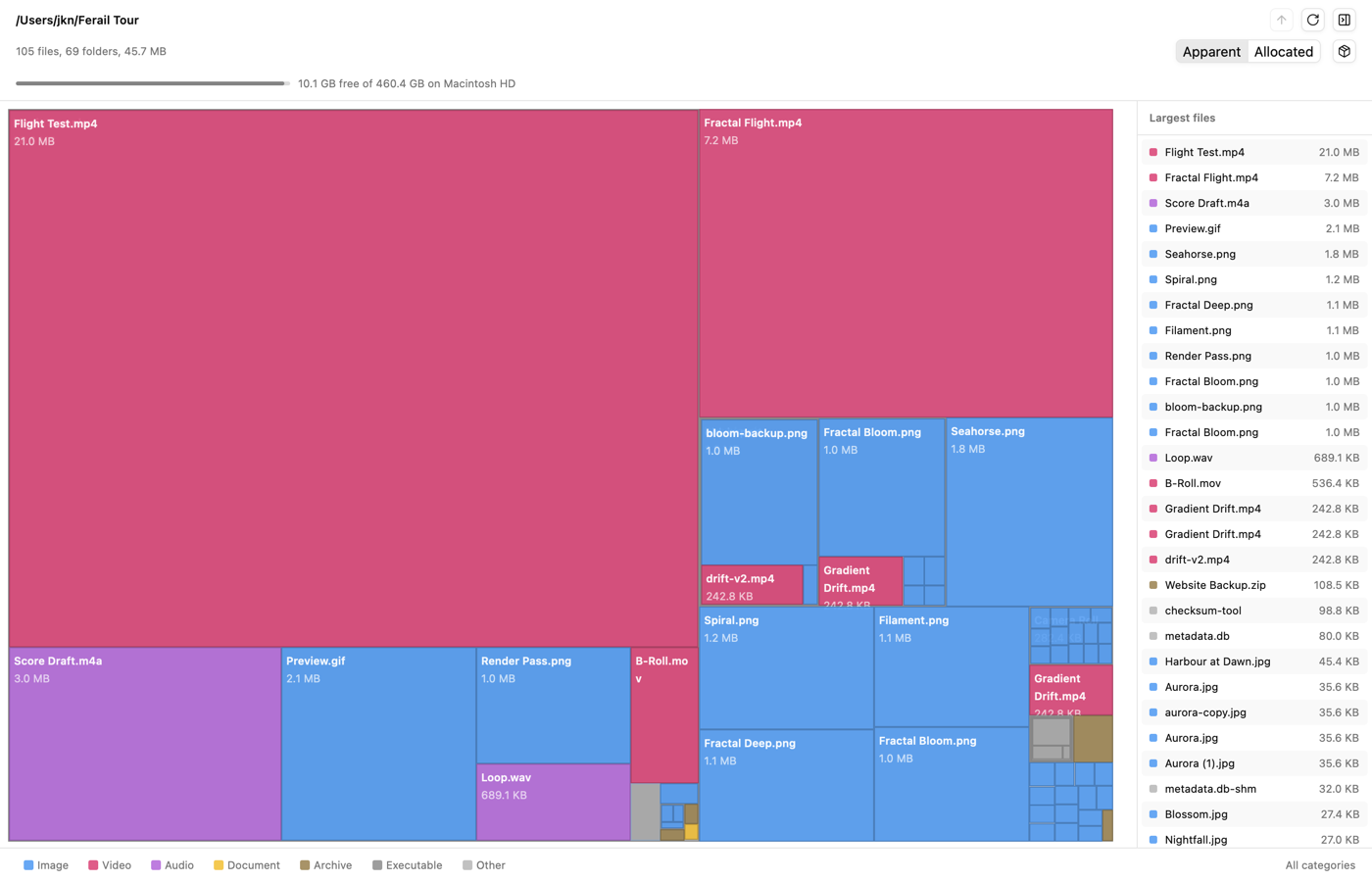
The same logic decided what belongs inside the app. Disk usage, duplicate finding, bulk rename, real previews, archive browsing - on every platform these are separate downloads, and archive integration in particular is lame everywhere: a right-click "extract", a read-only peek, no way to just work inside one. In Ferail an archive opens like a folder - sortable, filterable, drag in to add, drag out to extract - and disk usage, duplicates and rename are windows of the same app sharing the same identity of your files, not five utilities with five opinions.
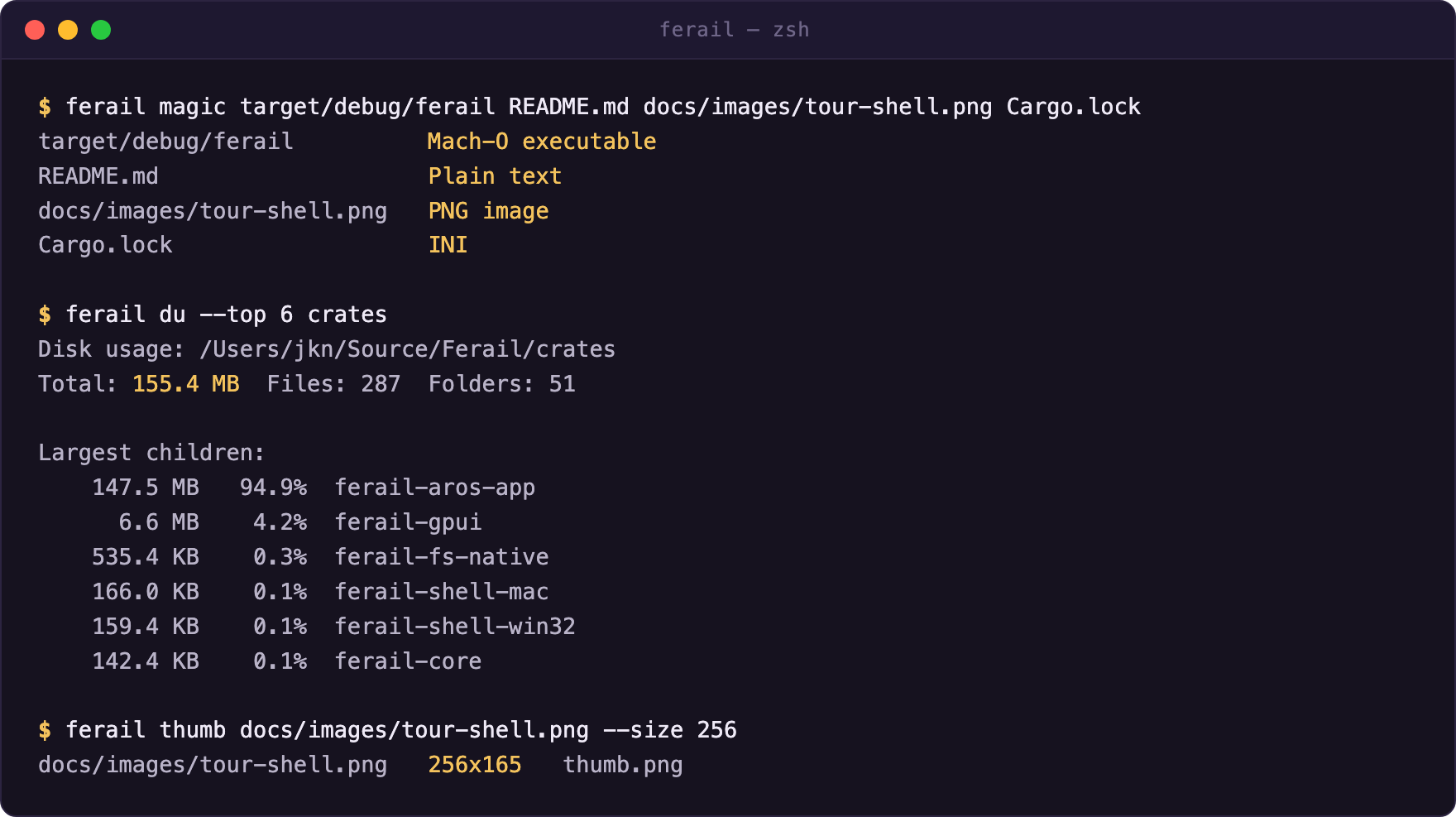
Some of it doesn't even need the window. The same binary is a small
command-line toolbox: ferail magic prints what files
really are, ferail du a disk-usage summary,
ferail thumb extracts any file's thumbnail to a PNG,
ferail doctor runs a health check. Same engines as the
UI, scriptable from a shell.
Names that lie
Somewhere along the way the project also became quietly
security-minded, because a file manager is where deception meets
the user. The classic trick is a filename that isn't what it
reads as: a zero-width space inside
invoice_final.exe, a right-to-left override that
reverses the visible extension, a Cyrillic
а impersonating a Latin one in
pаypal-login, padding spaces that shove
.exe off the edge of the column.
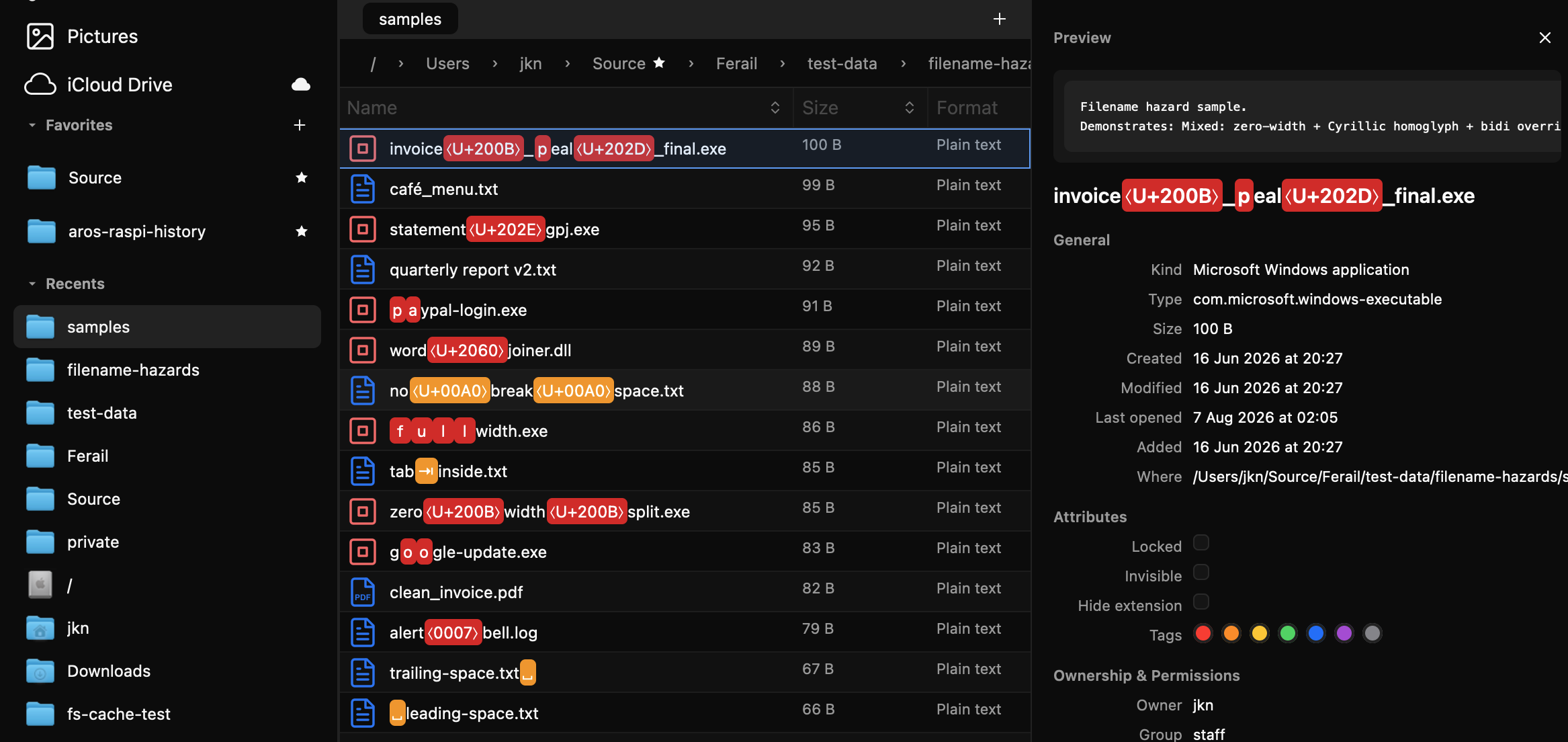
Ferail pre-scans every name and draws what is actually there:
invisible characters become explicit
⟨U+200B⟩-style chips, homoglyphs and disguised
whitespace are highlighted in place. The same honesty runs through
the rest of the pipeline. Content sniffing reports a file's true
nature no matter what the extension claims. Downloaded files carry
their "where from" provenance. The duplicate finder compares
content hashes, not names. And previewing inside an archive never
spills its contents onto disk under their real names - the one
staging file the system previewer needs is anonymised to a
constant name, overwritten by the next preview, and swept away
even after a crash. Nothing phones home, because there is no home
to phone.
One codebase, four systems
Rust also paid for something I didn't originally dare to plan. Ferail runs on macOS, Windows and - as of 0.3.0 - Linux, and the same codebase builds for AROS, the open-source AmigaOS reimplementation, on top of a Rust compiler I ported to that platform myself. That is the same machinery behind bringing exFAT to AROS: once the toolchain exists, "portable" stops being a slogan and becomes a build target. A file manager whose UI stack runs from an Apple-silicon Mac to an Amiga-descended hobby OS is a decent proof that the foundations are actually foundations.
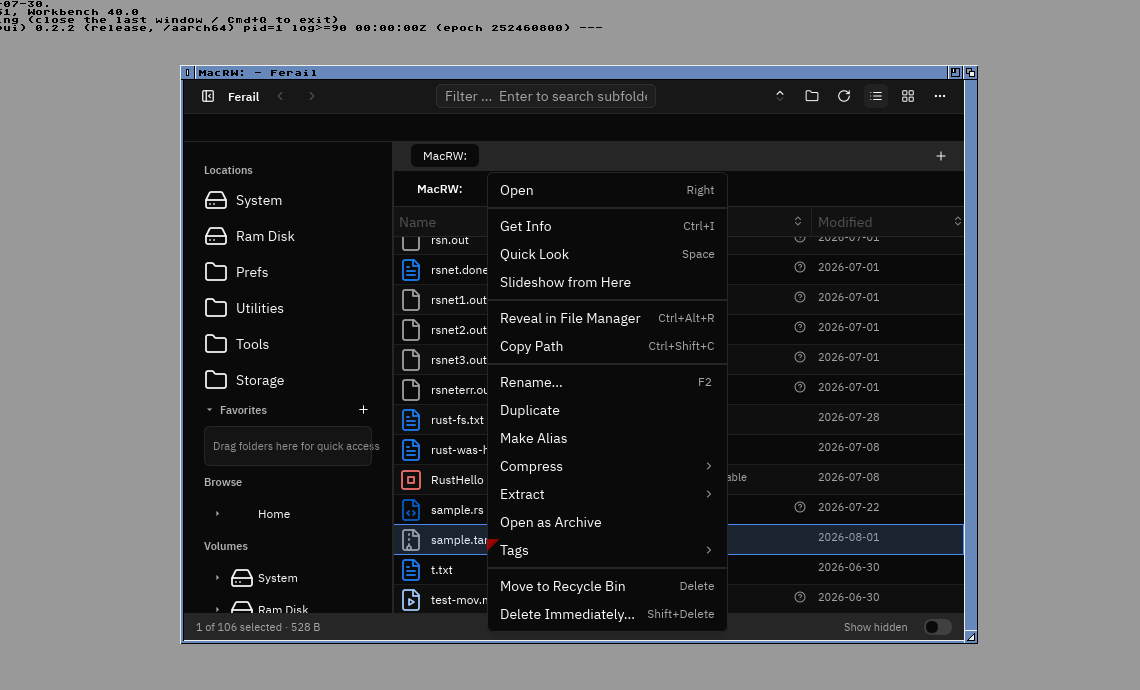
The source is now public at github.com/jonx/Ferail, dual-licensed MIT/Apache-2.0, with downloads for macOS, Windows and Linux if you just want the app.
The name came before most of the code. Ferraille is French for scrap iron - the pile of old metal at the back of every workshop, kept because one day you'll melt it down and build the tool you actually wanted. So while Microsoft is still sanding away at its own oxide layer, one preload at a time, let's find out how our feraille will stand the passage of time.